9-part series · Ages 11–16
How the Internet Works
Nine infographics that follow your data from your phone, through routers and undersea cables, to a server and back.
Complete pack: all 9 parts in one PDF
Printable, with the quiz answers. Free under CC BY-NC 4.0.
The 9 parts
 Overview
How the Internet Works: A Network of Networks
 How it works
What Happens When You Open a Website?
 Parts
Data Packets Explained: What's Inside a Packet
 Compare
The Internet vs the Web: What's the Difference?
 Key numbers
The Internet by the Numbers
 Timeline
 of the Internet: From ARPANET to Today
 Key terms
Internet Key Terms: A Cheat Sheet
 Myths vs facts
Internet Myths: What People Get Wrong
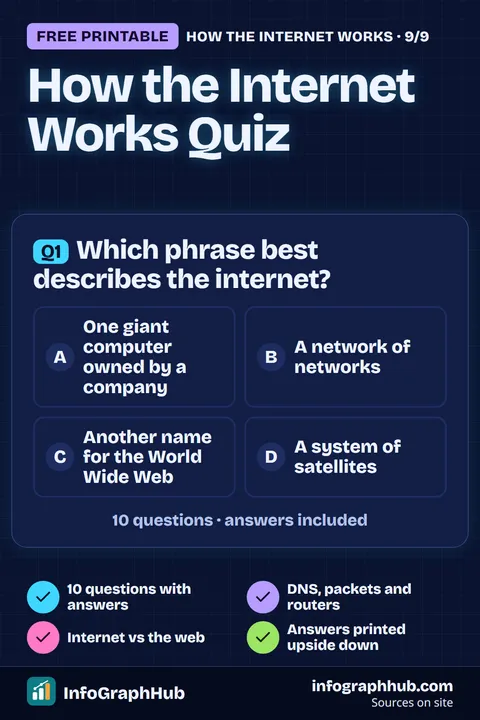 Quiz
Internet Quiz: 10 Questions on How the Internet Works


Watch the whole series

The complete guide
How the Internet Works explained
You use the internet every day, but almost all of it is hidden: cables under streets and oceans, routers in cabinets, servers in buildings you will never see. This series opens it up one question at a time: how the network of networks fits together, what happens in the second after you press Enter, what is inside a data packet, how the internet differs from the web, how big it all is, where it came from and which popular beliefs about it are wrong.
Each part is a printable infographic with sources, written for ages 11–16 and their teachers. Work through them in order, or jump to the part you need, then test yourself with the quiz at the end.
What the internet is: a network of networks
A network is a group of devices connected so they can exchange data. The Wi-Fi in a home is a small one, called a local area network (LAN). The internet is what you get when tens of thousands of networks, run by internet service providers, companies, universities and governments, agree to connect to each other and to follow the same rules. Those rules are called protocols, and the most important are TCP/IP.
Three ideas explain most of how it works:
- Addresses. Every connected device has an IP address, so data can be sent to the right place.
- Packets. Data is cut into small packets that travel separately and are put back together at the other end.
- Routers. Devices called routers pass packets from network to network until they arrive.
Nobody owns the whole internet and there is no central control room. Because it is distributed, any device or network that follows the protocols can join, and if one cable or data centre fails, packets can usually find another route.
See the infographic: Part 1, How the Internet Works: A Network of Networks →
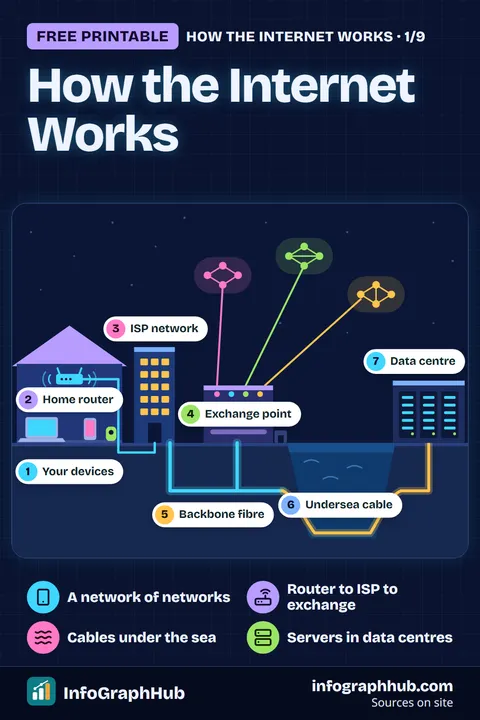
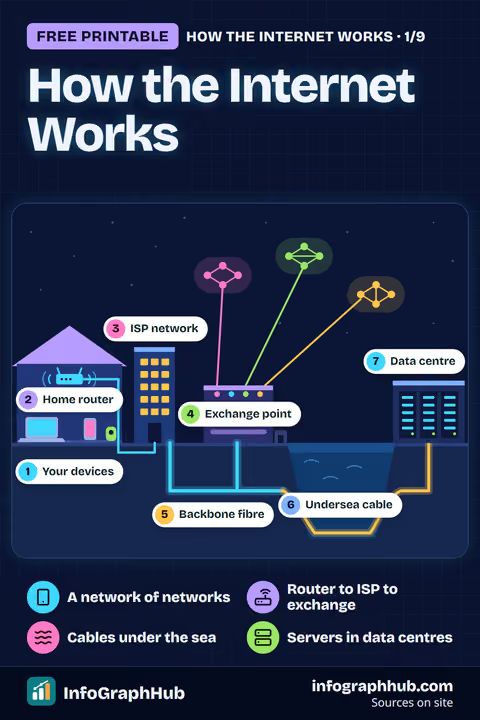
The journey: from your device to a data centre
Follow a single message from your phone to a video service on another continent.
- Your device connects to a router, by a cable or by Wi-Fi, a short-range radio link. Away from home, a mobile network does the same job.
- The home router usually contains a modem, which sends data along a telephone line, cable line or fibre to your internet service provider (ISP).
- Your ISP runs its own network of routers. To reach other networks it pays larger 'transit' networks, or meets them at internet exchange points (IXPs), buildings full of switches where many networks swap traffic directly. Networks tell each other which addresses they can reach using a protocol called BGP.
- Long distances are covered by backbone links: fibre-optic cables that carry data as pulses of light.
- To cross an ocean, the data takes an undersea cable. Near the coast these are buried under the seabed; in the deep ocean they lie on the bottom, most of the way no thicker than a garden hose.
- At the far end is a server in a data centre: a building full of computers that store websites, videos and apps. 'The cloud' means servers like these, used over the internet.
The reply comes back the same way, though not necessarily along exactly the same route.
See the infographic: Part 1, How the Internet Works: A Network of Networks →
Packets and protocols
Sending a whole file down one line at once would block that line for everyone else. Instead the internet uses packet switching: data is split into packets, each sent on its own, so millions of people can share the same cables and only a lost piece has to be sent again.
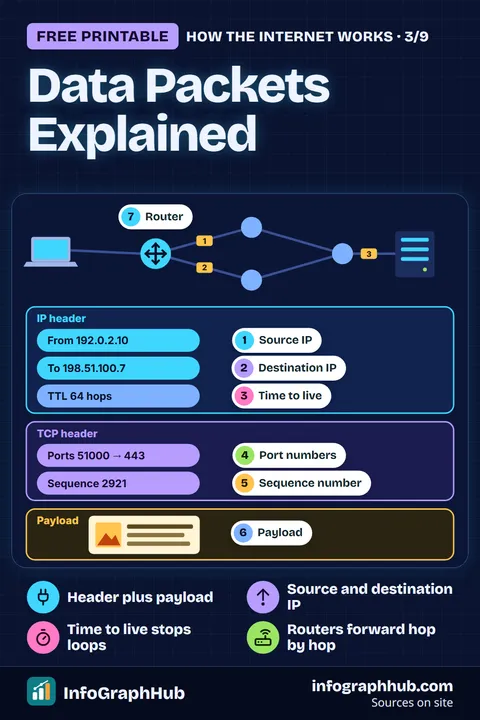
Every packet has headers, like the address on an envelope, and a payload, the data itself.
- The IP header holds the source and destination IP addresses and a time to live (TTL), a counter that drops by one at every router. If it reaches zero the packet is discarded, so lost packets cannot circle forever.
- The TCP header holds port numbers, which say which program the data is for (secure websites use port 443), and a sequence number that shows where the piece belongs.
On most networks a packet is at most about 1,500 bytes, and the IP and TCP headers usually take about 40 of those. That leaves roughly 1,460 bytes of data, so a 3 MB photo needs at least 3,000,000 ÷ 1,460 ≈ 2,055 packets.
Routers read each packet's destination address, check a routing table and forward it one hop closer. Packets from one message may take different routes and arrive out of order. TCP at the receiving end puts them back in order, acknowledges them and asks for any missing ones again. Some live video and games use UDP instead, which is faster but skips these checks.
See the infographic: Part 3, Data Packets Explained: What's Inside a Packet →
Addresses, names and DNS
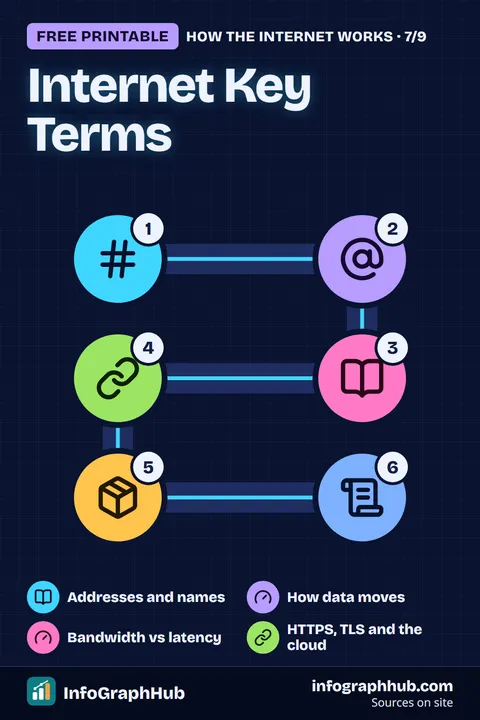
Computers find each other by IP address. An IPv4 address is written as four numbers from 0 to 255, such as 192.0.2.10; an IPv6 address is longer and uses hexadecimal, such as 2001:db8::1. People prefer names, so websites have domain names such as example.com, and a URL such as https://www.example.com/news adds the protocol (https) and the path to one page.
The Domain Name System (DNS) translates names into IP addresses, like a phone book. When a name is not already stored (cached) in your browser or computer, a DNS resolver, usually run by your ISP, asks a chain of servers: a root server points to the servers for .com, those point to the servers for example.com, and that authoritative name server gives the address. The resolver remembers the answer for a while, which is one reason a second visit to a site is faster.
Two more terms are easy to confuse. Bandwidth is how much data a connection can carry each second, in megabits or gigabits per second. Latency is how long data takes to arrive, in milliseconds, and it grows with distance. A connection can have plenty of bandwidth and still feel slow if latency is high.
See the infographic: Part 7, Internet Key Terms: A Cheat Sheet →
What happens when you open a website
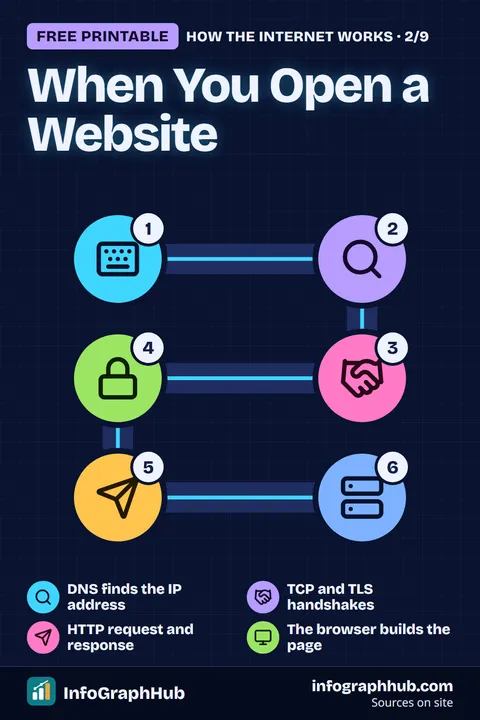
Opening a web page brings all of these ideas together, usually in a second or two:
- You enter a URL. The browser picks out the scheme, the domain name and the path.
- DNS lookup. The browser gets the server's IP address.
- TCP handshake. The browser and server exchange three messages, SYN, SYN-ACK and ACK, to open a connection.
- TLS handshake. For an
httpsaddress, the server proves its identity with a certificate, and both sides agree secret keys, so everything after this is encrypted. - HTTP request. The browser asks for the page, for example
GET /news. - HTTP response. The server sends a status code, such as
200 OKor404 Not Found, followed by the page's HTML, in packets. - Rendering. The browser reads the HTML, requests the CSS, JavaScript and images it links to, and paints the page.
A single page can trigger dozens of requests, often to several different servers, which is why fast websites keep their files small and store copies close to their users.
See the infographic: Part 2, What Happens When You Open a Website? →
The internet and the World Wide Web
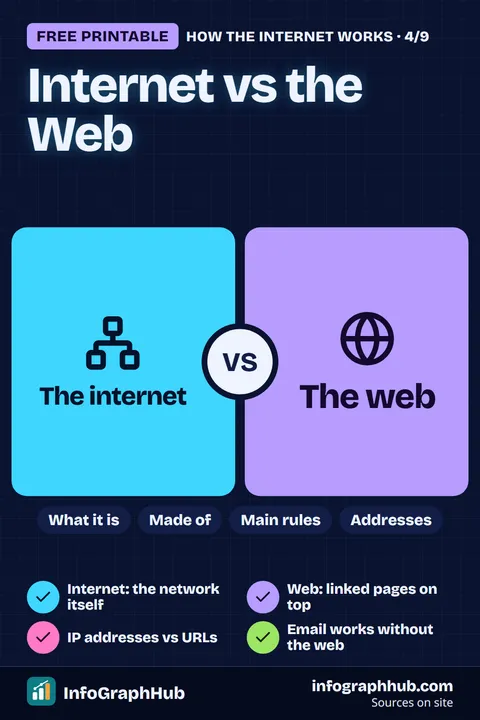
The two words are often used as if they meant the same thing, but they do not. The internet is the infrastructure: cables, routers, servers and the TCP/IP rules that move packets between IP addresses. The World Wide Web is one service that runs on top of it: a vast collection of pages and files, written in HTML, found by URLs, fetched with HTTP or HTTPS and joined by hyperlinks.
A useful comparison is roads and a delivery company. The internet is the road network; the web is one company using it. Email, online games, video calls and many smart devices are other users of the same roads. So the web needs the internet, but the internet does not need the web.
See the infographic: Part 4, The Internet vs the Web: What's the Difference? →
How the internet began
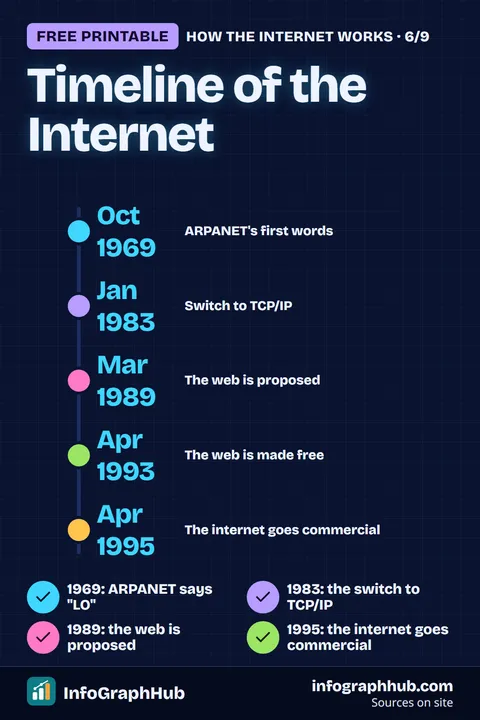
The internet grew out of ARPANET, a US research network built so that scientists at different universities could share computers. Its first message was sent on 29 October 1969, from UCLA to the Stanford Research Institute; the system crashed after two letters, 'LO'. A popular story says ARPANET was designed to survive a nuclear war, but the pioneers' own history for the Internet Society calls that a false rumour.
Key steps followed:
- 1972: the first email software and the first public demonstration of ARPANET.
- 1 January 1983: ARPANET switched to TCP/IP, designed by Vint Cerf and Bob Kahn, letting different networks join into one internet.
- 1989 to 1991: Tim Berners-Lee at CERN proposed and built the World Wide Web, with the first web server at
info.cern.ch. - April 1993: CERN made the web software free for anyone to use.
- April 1995: the US government stopped funding the main NSFNET backbone and commercial companies took over running the network.
The basic design has hardly changed since: separate networks, joined by open rules, passing packets.
See the infographic: Part 6, Timeline of the Internet: From ARPANET to Today →
How big the internet is
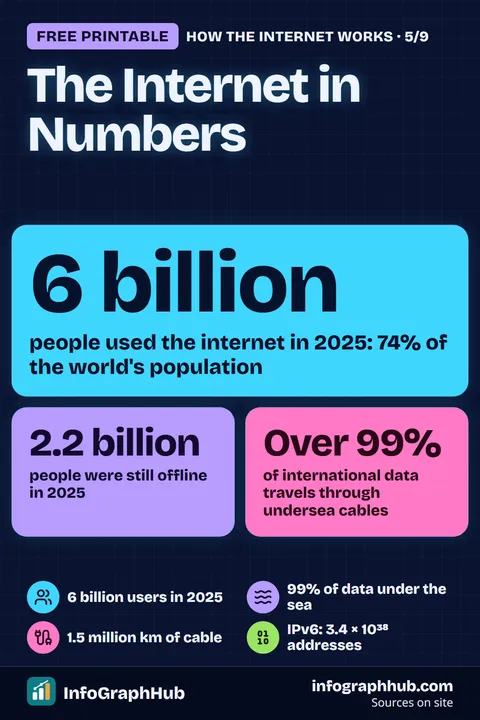
The International Telecommunication Union (ITU) estimates that about 6 billion people, 74 per cent of the world's population, used the internet in 2025, while about 2.2 billion were still offline. The gap is wide: 94 per cent of people in high-income countries are online, but only 23 per cent in low-income countries. This is often called the digital divide.
The physical network is just as striking. Undersea cables carry over 99 per cent of international data, and TeleGeography estimates that over 1.5 million kilometres of them were in service in early 2026, enough to circle the Equator about 37 times (1,500,000 ÷ 40,075 km ≈ 37). On 1 October 2026 the CIDR Report counted about 79,500 separate networks (autonomous systems) in the global routing system.
Addresses ran short long ago. IPv4 addresses are 32 bits long, so there are 2³² = 4,294,967,296 of them, fewer than one per person; the central pool of unused IPv4 addresses ran out on 3 February 2011. IPv6 uses 128-bit addresses, giving 2¹²⁸ ≈ 3.4 × 10³⁸. The switch is gradual: in late September 2026 about 46 per cent of Google's users reached it over IPv6.
Common misconceptions, and staying safe
Because the internet is mostly invisible, myths about it are common:
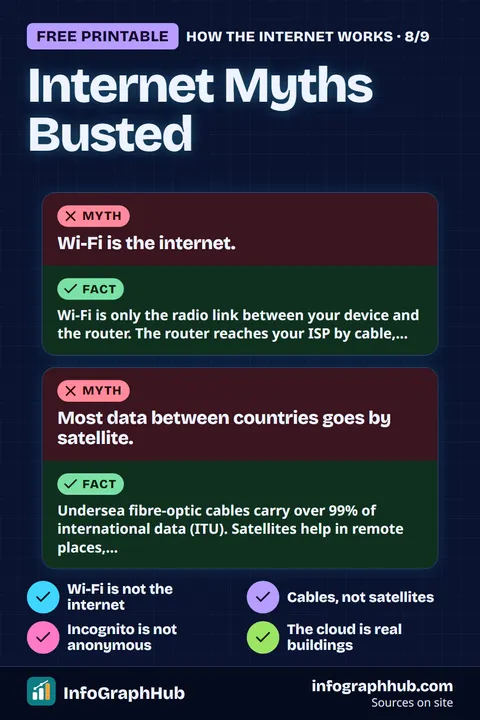
- 'Wi-Fi is the internet.' Wi-Fi is only the radio link to your router. You can have full Wi-Fi bars and no internet if the router's connection to the ISP is down.
- 'Most data goes by satellite.' Undersea cables carry over 99 per cent of international data.
- 'The cloud is not physical.' It is servers in real data centres.
- 'Incognito mode makes me anonymous.' It only stops the browser saving your history on that device. Websites, and whoever runs the network, such as a school, employer or ISP, may still see your activity.
- 'The padlock means the site is safe.' HTTPS means the connection is encrypted. It does not prove who runs the site; criminals use HTTPS on phishing sites too, so always check the web address.
- 'More bandwidth fixes everything.' Bandwidth does not reduce the delay caused by distance.
Understanding how the internet really works is the best protection against these mistakes. Ready to check what you have learned? The quiz covers every part of this guide.
See the infographic: Part 8, Internet Myths: What People Get Wrong →
Frequently asked questions
How does the internet work in simple terms?
Devices are joined into networks, and tens of thousands of networks are connected to each other by internet service providers and cables. Data is split into small packets with addresses on them; routers pass the packets from network to network until they reach the right device, where they are put back together.
What is the difference between the internet and the World Wide Web?
The internet is the global network of networks: cables, routers and the TCP/IP rules that move data. The web is one service on it: linked pages and files found by URLs and fetched with HTTP. Email and online games use the internet without using the web.
What happens when you type a website address?
DNS finds the server's IP address, the browser opens a connection with a TCP handshake, sets up encryption with TLS for https sites, sends an HTTP request, receives the page in packets and then builds and displays it, usually within a second or two.
How does the internet travel across the ocean?
Through fibre-optic cables laid on the sea floor, which carry data as pulses of light. They carry over 99 per cent of international data. Satellites carry only a small share, mainly for remote places, ships and aircraft.
Who controls the internet?
No single organisation. Each network is run by its own owner, such as an internet service provider, company, university or government. They connect by agreement and follow shared open standards, so there is no central control room or master switch.
Sources & methodology
Every fact is checked against the sources below. We write original explanations and draw original graphics; no figures are copied from textbooks. Spotted an error? See our corrections policy.
- How does the Internet work? (Cloudflare Learning Center, accessed 1 Oct 2026)
- What is DNS? How DNS works (Cloudflare Learning Center, accessed 1 Oct 2026)
- What is a packet? (Cloudflare Learning Center, accessed 1 Oct 2026)
- How does the Internet work? (MDN Web Docs (Mozilla), accessed 1 Oct 2026)
- How the web works (MDN Web Docs (Mozilla), accessed 1 Oct 2026)
- Facts and Figures 2025: Internet use (International Telecommunication Union (ITU), accessed 1 Oct 2026)
- Submarine Cable FAQs (TeleGeography, accessed 1 Oct 2026)
- Brief History of the Internet (Internet Society, accessed 1 Oct 2026)
- IP packets (Khan Academy, accessed 1 Oct 2026)
- Types of network (KS3 Computer Science) (BBC Bitesize, accessed 1 Oct 2026)
Editorial review pending · Updated
For teachers and parents: new InfoGraphHub resources by email
One short email when new free resources go live. For adults (18+) only. No spam, no tracking in emails, unsubscribe anytime.